Table of Contents
- Best Smart Gadgets for Apartments: Quick Comparison
- Smart Home Devices for Renters: Installation & Setup
- Smart Plugs and Outlets: Foundation of Apartment Automation
- Smart Lighting Solutions for Small Apartment Living
- Smart Home Security for Apartments: Cameras and Smart Locks
- Smart Voice Assistants and Hubs for Small Apartment Smart Tech
- Affordable Smart Home Devices for Apartments: Budget Breakdown
- Privacy, Data Security, and Compatibility for Apartment Renters
Last Updated: July 26, 2026
Finding the best smart gadgets for apartments requires balancing convenience with rental-friendly constraints. At WellnessLifeClub74, we understand that apartment dwellers face unique challenges: limited space, no permanent modifications allowed, and the need for portability between moves. This guide covers the smartest devices for renters that deliver real value without compromising your security deposit.
Best Smart Gadgets for Apartments: Quick Comparison
The smart home market has matured significantly, but not all devices suit apartment living equally. Renters need solutions that install without drilling, wiring, or permanent changes. The best smart gadgets for apartments share three core traits: plug-and-play setup, renter-friendly installation, and seamless integration with major voice assistants.
| Device Type | Starting Price | Installation | Best For | Key Advantage |
|---|---|---|---|---|
| Smart Plugs | $8-$15 | Plug in outlet | Budget automation | No hub required |
| Smart Bulbs | $20-$50 | Screw into fixture | Lighting control | Color customization |
| Smart Speakers | $30-$100 | Sit on shelf | Voice control | Hands-free operation |
| Smart Locks | $150-$200 | Retrofit to deadbolt | Access control | No drilling needed |
| Security Cameras | $35-$150 | Mount on shelf/wall | Monitoring | Local storage option |
Smart Home Devices for Renters: Installation & Setup
Non-destructive installation separates gadgets that work for renters from those that don't. Before purchasing any smart device, verify that setup requires no permanent modifications to walls, doors, or electrical systems. Most apartment leases explicitly prohibit drilling, painting over outlets, or replacing hardware.
The best smart gadgets for apartments follow a simple principle: they must leave zero trace when removed. This means adhesive strips instead of nails, clip-on mounts instead of screws, and retrofit designs that layer over existing hardware rather than replacing it.
Non-Destructive Installation Essentials
Start with your Wi-Fi network strength. Apartments often have dead zones due to walls, interference, and distance from the router. Test each gadget's placement before final setup.
Document your setup process. Take photos of how devices were installed before you moved in, and keep receipts for all equipment. This protects your security deposit by proving you made no permanent changes.
Smart Plugs and Outlets: Foundation of Apartment Automation
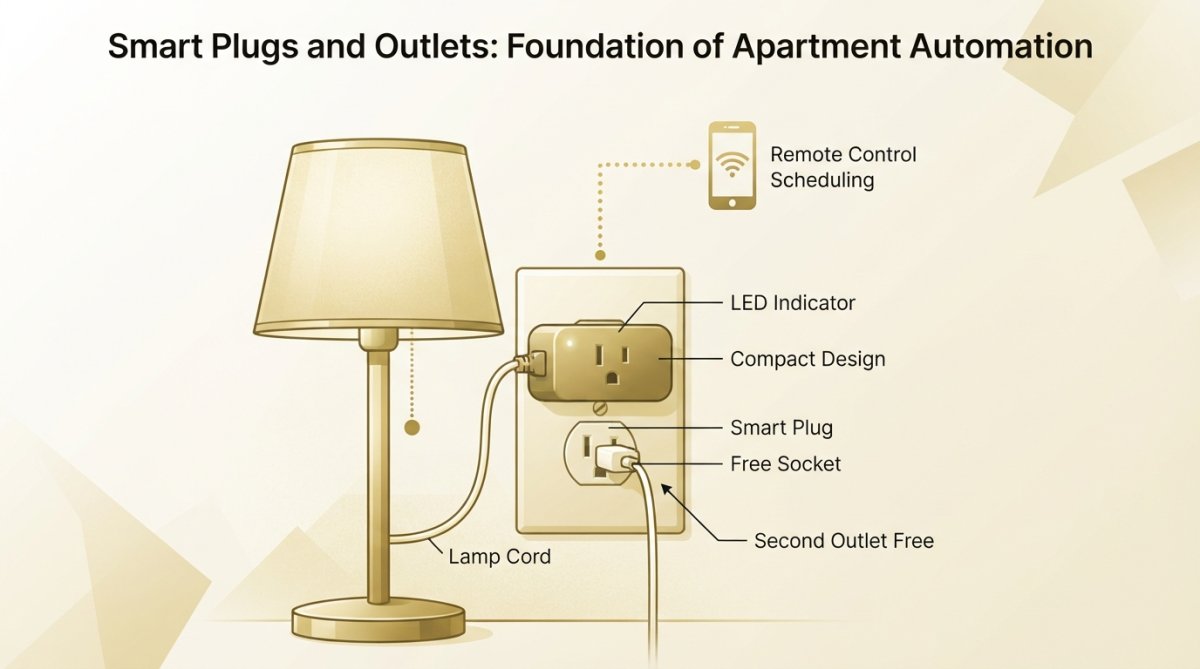
Smart plugs are the fastest way to add automation to any apartment. They convert "dumb" appliances into controllable devices without requiring technical expertise. A single smart plug can control a lamp, fan, coffee maker, or space heater through voice commands or scheduled routines.
TP-Link Kasa Smart Plug Mini: Compact and Affordable
The TP-Link Kasa Smart Plug Mini delivers renter-friendly automation at $14.62. Its compact design leaves space for another device in the outlet, critical in apartments where outlet real estate is scarce. The plug connects directly to your Wi-Fi network with no hub required and integrates with both Amazon Alexa and Google Assistant. Setup takes under two minutes: plug it in, download the Kasa app, scan the QR code, and select your Wi-Fi network.
Pros:
- Extremely affordable entry point to smart home automation
- Compact design preserves outlet access
- Works with Alexa, Google Assistant, and IFTTT routines
- Portable and moves easily between apartments
Cons:
- Requires Wi-Fi connectivity
- Only controls on/off, no dimming
- Occasional app connectivity issues reported
GE Cync Smart Indoor Plug: Multi-Platform Compatibility
The GE Cync Smart Indoor Plug ($13.49) offers broader ecosystem compatibility than the Kasa Mini. If you're already invested in Apple HomeKit, Google Home, or Samsung SmartThings, this plug integrates seamlessly with all three. Create complex automation rules: "Turn on the living room lamp at sunset, but only on weekdays."
Pros:
- Works with Alexa, Google Assistant, and Apple HomeKit simultaneously
- Compact design similar to Kasa Mini
- Strong app interface with detailed scheduling options
- No hub required
Cons:
- Requires stable Wi-Fi connection
- Limited to on/off control
- Setup requires separate app account creation
IKEA Tradfri Smart Plug: Budget-Conscious Choice
The IKEA Tradfri Smart Plug costs just $8.00 and includes a battery-powered physical remote control. For renters who prefer tactile controls, this is the only plug that includes a remote out of the box. The plug supports Matter protocol, which integrates with Apple Home if you have a HomePod as a hub.
Pros:
- Lowest price on the market
- Includes physical remote control
- Matter protocol support for future compatibility
- Works with IKEA's broader smart home ecosystem
Cons:
- Requires DIRIGERA hub for full app control and remote access
- Limited scheduling flexibility
- Smaller ecosystem of compatible devices
Smart bulbs transform apartment lighting without touching switches or wiring. Screw a smart bulb into any existing fixture, connect to Wi-Fi, and you control brightness, color temperature, and scheduling from anywhere. For apartments, smart bulbs offer flexibility that smart switches can't match, you can't permanently replace switches without landlord approval, but swapping out bulbs is explicitly permitted under most leases.
Philips Hue White and Color Ambiance: Customizable Ambiance
The Philips Hue White and Color Ambiance bulb ($49.99 per bulb) produces 16 million colors and adjusts white temperature from warm (2000K) to cool (6500K). Research shows that warm lighting in evenings improves sleep quality by reducing blue light exposure. Brightness adjusts from 1% to 100%, and pre-set scenes cover common use cases: "Energize" for morning workouts, "Relax" for evening wind-down, "Concentrate" for focused work.
The major limitation is the Philips Hue Bridge requirement ($50-$80). The bridge acts as a hub, connecting bulbs to your Wi-Fi and enabling remote access via the app. For renters, the bridge is an additional investment, but it unlocks the full feature set.
Pros:
- Extensive color and white temperature options
- Excellent app interface with scene creation
- Durable bulbs with long lifespan (25,000 hours)
Cons:
- Requires separate Hue Bridge for full functionality
- Higher cost per bulb than competitors
- Bridge adds to setup complexity
Smart Home Security for Apartments: Cameras and Smart Locks
Security devices address the top concern for apartment renters: protecting valuables and monitoring entry points. Smart security gadgets for apartments must respect privacy and lease terms. Cameras should point inward or at your door, never toward hallways or neighbors' units.
Wyze Cam v3: Affordable Security Monitoring
The Wyze Cam v3 ($35.98) delivers 1080p HD video, night vision, and motion detection at a price that undercuts most competitors by 50%. The camera records to a microSD card (sold separately), eliminating reliance on cloud storage subscriptions. This local storage approach protects your privacy; video stays on your device, not on Wyze's servers. Night vision uses infrared LEDs to capture clear footage in complete darkness. The 110-degree field of view covers most apartment entryways without distortion. Two-way audio lets you communicate through the camera, useful for instructing delivery drivers or checking on pets.
Pros:
- Lowest price point for quality security
- Local storage option avoids cloud fees
- Good night vision and motion detection
- Two-way audio for communication
Cons:
- Some users report false motion alerts without proper configuration
- Free tier has limited video history (14 days)
- Requires microSD card for local storage
August Wi-Fi Smart Lock: Non-Destructive Access Control
The August Wi-Fi Smart Lock (4th Generation) ($157.75) retrofits onto your existing deadbolt without drilling, replacing, or permanently modifying the door. The lock attaches to your existing deadbolt's interior side, turning the bolt electronically. Your original key still works; you're not replacing the lock, just adding electronic control on top. When you move, remove the August lock and leave the original deadbolt untouched.
Remote access via smartphone lets you unlock the door for guests, delivery drivers, or service workers without being home. Time-limited access codes expire automatically, preventing security gaps. The lock logs every entry, creating an audit trail of who accessed your apartment and when. Auto-lock and auto-unlock features work with geofencing.
Pros:
- Retrofits to existing deadbolt with no permanent modifications
- Remote access and guest management
- Geofencing and auto-lock/unlock features
- Maintains physical key access as backup
Cons:
- Higher price point than other smart home gadgets
- Requires stable Wi-Fi for remote features
- Some users report occasional connectivity issues

Smart Voice Assistants and Hubs for Small Apartment Smart Tech
A voice assistant hub serves as the command center for your smart home ecosystem. Instead of opening the app every time you want to adjust lighting or check security, you simply speak a command. Voice assistants also enable automation routines that trigger multiple devices simultaneously, "Goodnight" could lock your door, turn off lights, and arm your security camera in one command.
Google Nest Mini: Space-Saving Control Center
The Google Nest Mini (2nd Gen) costs $30-$50 and delivers Google Assistant functionality in a form factor roughly the size of a hockey puck. Google Assistant integrates seamlessly with Google services (Calendar, Photos, Tasks, Gmail). The built-in speaker provides decent audio quality for voice commands and basic music playback. Wall-mounting is straightforward using adhesive strips or small nails.
Pros:
- Most affordable smart speaker on the market
- Compact size ideal for small apartments
- Excellent Google service integration
- Wall-mountable design saves space
Cons:
- Bass response is limited compared to larger speakers
- Smaller smart home ecosystem than Alexa
- No display screen (LED indicators only)
Affordable Smart Home Devices for Apartments: Budget Breakdown
Building a smart home in an apartment doesn't require spending thousands. Strategic purchases starting with the cheapest devices and expanding gradually let you test the ecosystem before committing to expensive equipment. A realistic budget for a functional apartment smart home starts at $100-$150 and covers the essentials: two smart plugs, one smart speaker, and one smart bulb.
Start with a single smart plug ($8-$15) to test the concept without financial risk. Two smart plugs ($16-$30 total) cover most apartment automation needs. Add a smart speaker ($30-$50) as your hub, then one smart bulb ($20-$50) to your primary reading lamp. Total investment: $50-$100.
Privacy, Data Security, and Compatibility for Apartment Renters
Smart devices collect data about your habits, preferences, and presence patterns. Most smart devices send data to company servers for processing. For renters, this raises questions about privacy and data retention.
Data Security Best Practices for Renters
Create a separate email account for smart home devices. Use a unique, complex password that differs from your email password. Enable two-factor authentication on every smart home account; this prevents unauthorized access even if someone obtains your password. Update device firmware regularly, manufacturers release updates to patch security vulnerabilities.
Compatibility Checklist: Matter Protocol and Interoperability
The Matter protocol emerged in 2022 as an open standard for smart home devices. Instead of each manufacturer creating proprietary protocols, Matter enables devices from different brands to communicate directly. When shopping for smart gadgets for apartments, prioritize devices with Matter support.
Check compatibility before buying:
- Does the device support your primary voice assistant (Alexa, Google, Apple)?
- Does it require a hub, or connect directly to Wi-Fi?
- Does it support Matter protocol for future compatibility?
- Can it be installed without permanent modifications?
- Does the company have a track record of security updates?
- Is local storage or offline mode available (cameras, locks)?
- What happens to the device if the company discontinues the app?
Devices that check all boxes integrate smoothly into apartment smart homes and reduce frustration later.
Building a smart apartment doesn't require expensive overhauls or permanent modifications. The best smart gadgets for apartments prioritize portability, easy installation, and genuine convenience. Start with an affordable smart plug and a voice speaker, then expand based on your needs. At WellnessLifeClub74, we curate high-quality smart home devices designed specifically for renters and apartment dwellers. Our selection focuses on non-destructive installation, reliable performance, and seamless ecosystem integration. Explore our smart home collection today and transform your apartment into a connected space that moves with you.
Frequently Asked Questions
What are the best smart gadgets for renters in apartments?
The best smart gadgets for apartments are non-destructive, portable devices like smart plugs (TP-Link Kasa Mini, GE Cync), smart bulbs (Philips Hue), smart speakers (Google Nest Mini), and non-permanent smart locks (August Wi-Fi). These require no drilling, installation modifications, or landlord approval. They connect via Wi-Fi or Bluetooth and can move with you to your next apartment. Prioritize renter-friendly options that don't alter your living space permanently.
How can I set up smart home devices for renters without permanent installation?
Smart home devices for renters use plug-and-play technology requiring only Wi-Fi connectivity. Smart plugs simply insert into outlets; smart bulbs screw into existing light fixtures; smart speakers sit on shelves or tables; and smart locks retrofit over existing deadbolts without drilling. Download the device's app, connect to your Wi-Fi network, and follow the setup wizard. No tools, landlord permission, or permanent modifications needed. Most setup takes under 10 minutes per device.
What's the difference between affordable smart home devices and premium options for apartments?
Affordable smart home devices for apartments (under $50) like IKEA Tradfri plugs and GE Cync offer basic on/off control and scheduling. Premium options (Philips Hue, August locks) include advanced features like color customization, remote access, guest management, and superior app interfaces. For renters, affordable devices are ideal for testing smart home ecosystems before committing. Budget $100-$300 for a starter apartment setup with plugs, a speaker, and one smart light.
How do I ensure privacy and data security with smart home devices in my apartment?
Protect privacy by choosing devices with local storage options (Wyze Cam with microSD card), enabling two-factor authentication on all apps, using strong passwords, and reviewing privacy policies before purchase. Avoid cloud-dependent devices if privacy is critical. Check if devices use encryption for data transmission. Disable microphones on smart speakers when not needed. For renters, prioritize brands with transparent data practices and no long-term data retention. Review app permissions carefully during setup.
What smart home security devices work best for small apartment living?
Smart home security for apartments includes compact cameras (Wyze Cam v3 at 1080p HD) that mount on shelves or tables without drilling, and non-permanent smart locks (August Wi-Fi) that retrofit existing deadbolts. These devices offer motion detection, two-way audio, and remote monitoring via smartphone apps. Wyze Cam supports local storage via microSD card to avoid monthly subscription costs. August locks enable guest access management and emergency lockout prevention, ideal for renters seeking enhanced security without permanent modifications.
This article was written using GrandRanker